A tactile PCB membrane switch looks simple, yet its performance depends on many small design decisions. The right switch should provide clear feedback, stable electrical contact, and comfortable operation. It must also fit the product’s space, circuit layout, and expected service life. A crowded control panel may need compact keys with moderate actuation force. A machine used with gloves may require larger buttons and stronger tactile feedback. Start with the operator’s real working conditions.
Choosing a Tactile PCB membrane switch involves more than comparing prices or surface graphics. Review actuation force, travel distance, contact rating, key size, connector type, and available circuit materials. Check how the switch performs under dust, moisture, temperature changes, and repeated pressing. Physical samples can reveal problems that drawings hide. The click may feel too sharp. The overlay may wear near frequently used keys. These details matter.
Reliable suppliers should provide clear specifications, inspection records, and practical testing evidence. Ask about adhesive strength, printed ink durability, PCB quality, and production consistency. Independent verification can strengthen confidence when the application is safety-critical or exposed to harsh environments. Still, no checklist replaces careful evaluation. A design may appear perfect during a short trial and fail after months of daily use. That possibility deserves attention. Good selection combines engineering judgment, user feedback, and honest review of trade-offs. It also leaves room for improvement when early assumptions prove wrong.
How to Choose the Right Tactile PCB Membrane Switch?
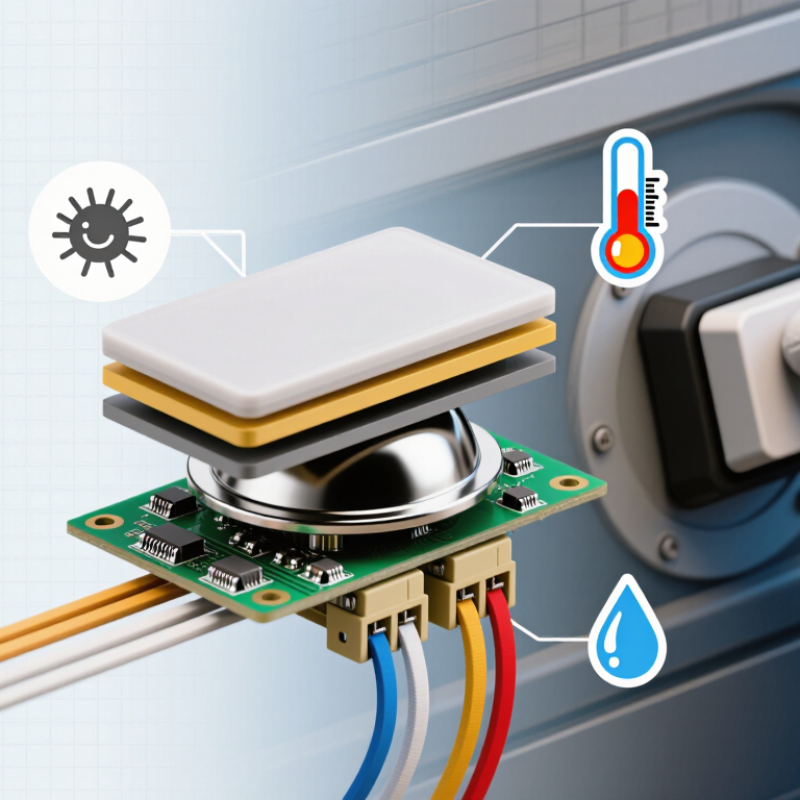
A tactile PCB membrane switch combines an overlay, graphic layer, spacer, metal dome, PCB, adhesive, and tail connector. The dome sits above exposed PCB contacts. When pressed, it collapses and bridges the circuit. Releasing the key restores its shape and opens the circuit. That small snap is both a physical signal and an electrical event. The controller still needs debounce logic, because contact vibration can create false pulses.
According to Fortune Business Insights, the global membrane switch market was valued at approximately USD 6.57 billion in 2024. Its forecast also indicates continued growth through 2032. This growth reflects demand for thin, sealed, and customized interfaces in industrial and medical equipment. However, market growth does not guarantee a suitable design. A switch with a 160-gram dome may feel precise on a panel, yet uncomfortable during repeated operation.
Choose dome force, travel, and life cycles together. Then check PCB contact plating, tail routing, adhesive thickness, and sealing requirements. IP-rated construction can reduce dust and moisture risks, but only when the enclosure and cable exit are designed consistently. IPC-2221 guidance remains useful for PCB spacing and reliability decisions. In practice, prototypes often expose weaknesses: uneven backlighting, dome misalignment, or a spacer that compresses too easily. Testing only one sample is not enough. Temperature cycling, humidity exposure, and repeated presses reveal the real structure.
Choosing a tactile PCB membrane switch starts with the required user response, not its appearance. During prototype testing, measure actuation force, travel distance, and return force with a force gauge. A crisp peak can confirm activation, while excessive force causes finger fatigue. Short travel may feel efficient, but it can reduce feedback when operators wear gloves. Test both bare-handed and gloved use. Small details matter.
Electrical performance needs equal attention. Check contact resistance, rated current, insulation resistance, and expected switching cycles. Compare these values with the PCB circuit and the real load, not only the datasheet headline. A switch used near motors may need stronger noise control and better grounding. Confirm connector alignment, tail routing, and solder or adhesive compatibility. A few millimeters of misalignment can create intermittent presses.
Environmental protection often decides reliability. Review operating temperature, humidity, dust exposure, and cleaning chemicals before selecting materials. Sealing can protect the contacts, but it may change tactile force over time. In one evaluation, the first sample felt excellent, yet its return became slower after repeated thermal cycling. That result was inconvenient, but useful. Test prototypes through realistic cycles, including side presses and uneven force. Record failures, not just successful measurements. The selected switch should maintain predictable performance inside the actual enclosure.
| Performance Factor | Typical Selection Range or Requirement | Effect on Product Performance | What to Confirm Before Selection | Priority |
|---|---|---|---|---|
| Actuation Force | Approximately 100–500 gf, depending on the application | Determines the effort required to activate the switch and strongly affects user comfort, accidental activation, and perceived quality. | Match the force to the operator, button size, operating environment, and whether the switch will be pressed with a finger, glove, or tool. | High |
| Tactile Travel | Commonly about 0.2–1.0 mm | Provides physical feedback when the contact changes state. Greater travel generally gives a more noticeable tactile response. | Verify that the travel is compatible with the overlay, spacer, actuator, and the required tactile feel. | High |
| Switching Voltage and Current | Must remain within the rated electrical load; low-level signal switching is typical | Exceeding the electrical rating can cause contact wear, arcing, unstable signals, or premature failure. | Compare the maximum switching voltage, current, and power with the PCB circuit. Use a relay or driver when the load is higher than the switch rating. | High |
| Contact Resistance | Typically specified at a low level, often below 100 mΩ when new | Low resistance helps maintain signal integrity and minimizes voltage drop, especially in low-voltage control circuits. | Check the initial value, test current, allowable change after life testing, and whether the value is specified before or after environmental exposure. | High |
| Insulation Resistance | Commonly specified in the tens of megohms or higher | High insulation resistance reduces leakage current and helps prevent unintended activation between adjacent circuits. | Confirm the test voltage, measurement points, minimum resistance, and performance after humidity or temperature testing. | High |
| Electrical Life | Often 100,000 to 1,000,000 actuations for suitable low-power designs | Indicates how many switching cycles the contacts can complete while remaining within specified electrical limits. | Use the expected daily actuation count to calculate the required service life. Confirm the test load and failure criteria used for the rating. | High |
| Contact Bounce | Normally controlled within a few milliseconds, depending on construction and circuit design | Bounce can create multiple unwanted signals during one press and may affect counters, digital inputs, and control systems. | Review bounce test data and provide hardware or software debouncing when the controller cannot tolerate transient switching. | Medium |
| Operating Temperature | A common general-purpose range is approximately −20°C to +70°C; wider ranges require verification | Temperature can change contact resistance, actuation force, elastomer behavior, adhesive performance, and material dimensions. | Specify the actual storage and operating temperatures, cycling conditions, and any temperature-related force or resistance limits. | High |
| Humidity and Moisture Resistance | Select a construction and sealing level appropriate to the environment | Moisture may reduce insulation resistance, corrode contacts, weaken adhesives, and cause intermittent operation. | Determine whether the product needs a sealed edge, gasket, venting strategy, or enclosure protection. Request humidity and water-exposure test results when applicable. | High |
| PCB Compatibility | The switch must match the PCB land pattern, thickness, solder process, and circuit layout | Poor compatibility can cause misalignment, insufficient solder joints, mechanical stress, or unreliable electrical contact. | Confirm footprint dimensions, terminal configuration, pad finish, PCB thickness, component clearance, and reflow or wave-soldering limits. | High |
| Mechanical Alignment and Mounting | Actuator position and mounting tolerances must match the membrane overlay and PCB assembly | Misalignment may create uneven force, incomplete actuation, excessive wear, or damage to the membrane structure. | Check positional tolerance, mounting method, panel thickness, button geometry, and the maximum allowable side load on the actuator. | High |
| Key Spacing and Button Layout | Choose spacing that prevents accidental adjacent activation | Layout affects usability, visual clarity, finger access, and the ability to operate the interface while wearing gloves. | Evaluate button diameter, center-to-center spacing, legends, backlighting space, and accessibility requirements. | Medium |
| ESD and EMC Considerations | The switch should be integrated with the product’s overall protection design | Electrostatic discharge and electromagnetic interference can cause false triggering, controller resets, or signal errors. | Review grounding, shielding, trace routing, protective components, debounce circuitry, and the applicable product-level compliance requirements. | High |
| Material and Chemical Resistance | Materials must tolerate expected cleaners, oils, solvents, sweat, and abrasion | Chemical attack and surface wear can degrade graphics, adhesives, overlays, contacts, or tactile response. | List all cleaning agents and process chemicals used in service. Request compatibility testing for the complete assembled switch. | Medium |
| Feedback and User Interface Requirements | Define the required combination of tactile, audible, and visual feedback | Clear feedback improves confidence and reduces repeated or incomplete presses during operation. | Specify tactile ratio, click sound, indicator lighting, legend visibility, and whether feedback must remain consistent throughout the product life. | Medium |
| Testing and Qualification | Use documented electrical, mechanical, environmental, and life-cycle tests | Qualification testing confirms that the switch performs reliably under the actual application conditions rather than only under nominal conditions. | Request inspection standards, sample test reports, dimensional limits, life-test conditions, and acceptance criteria before approving the design. | High |
A tactile PCB membrane switch should fit the user’s task, not just the product’s appearance. Start by defining the required actuation force, travel distance, and feedback level. A medical control panel may need a light, quiet press. Industrial equipment often benefits from firmer feedback and a clear click. Measure the operator’s gloves, hand position, and expected button frequency. Small details matter.
The environment also shapes the design. Dust, moisture, cleaning chemicals, and temperature changes can affect the membrane, adhesive, and printed contacts. Specify the sealing level and surface material before tooling begins. For high-use keys, request life-cycle testing with the intended force. In prototype reviews, compare real samples under realistic conditions. A switch can feel excellent on a workbench but uncomfortable after eight hours. That mistake is easy to make.
Tips: Use a force-travel chart, not a guess. Test samples with gloves and wet fingers. Leave space between adjacent keys to reduce accidental presses. Check PCB alignment and connector access early. A first design is rarely perfect. Some teams also overlook backlight brightness in daylight. Review that detail before production. Reliable decisions come from measured requirements, documented tests, and feedback from actual users.
How to Choose the Right Tactile PCB Membrane Switch?
Material, Circuit, and Actuation Options to Compare
Material choices affect feel, durability, and sealing. Polyester overlays suit flexible designs and resist repeated handling. Polycarbonate offers a clearer, harder surface, but it may show scratches sooner. Check the adhesive system too. A strong face adhesive can still fail on dusty or textured panels. In production evaluations, I inspect printed legends after simulated cleaning cycles. Small labels often reveal weak material choices first.
The circuit construction deserves equal attention. Silver ink works well for many low-current interfaces and supports economical layouts. Copper circuits provide excellent conductivity and can suit compact, complex designs. However, copper usually needs better protection against moisture and oxidation. Compare tail length, connector style, and bend radius before approving the drawing. Actuation also changes the user experience. Metal domes create a crisp click and consistent force. Polyester domes feel softer, but their feedback can vary with temperature and age. My first prototype used a light actuation force. It felt fast, yet accidental presses increased. That shortcut was wrong.
Tips: Test the complete switch, not only the sample overlay. Measure actuation force, travel, rebound, and contact resistance. Try wet fingers, gloves, and side-angle presses. Ask operators to use it repeatedly. A specification sheet cannot fully describe fatigue, glare, or fingertip comfort. Leave tolerance for real assembly variation. Perfect drawings still meet imperfect hands.
A tactile PCB membrane switch should be tested as a complete assembly, not as a loose sample. Grand View Research valued the global membrane switch market at approximately USD 6 billion in 2023, with continued growth through 2030. That growth increases pressure to validate reliability early. In our evaluations, we measure actuation force, travel, contact resistance, and switching bounce across at least three production lots. A single sample proves very little.
Begin with a baseline test at room temperature. Record force using a calibrated gauge, then repeat after temperature cycling, humidity exposure, and vibration.
IEC 60512 test methods provide useful guidance for connector and contact evaluations, especially resistance and mechanical endurance. For tactile feedback, a 10% force variation may already feel inconsistent to operators.
Test illuminated keys in darkness and under angled light. Small legends can become unreadable after abrasion.
MarketsandMarkets projects the human-machine interface market to grow from about USD 5.8 billion in 2023 to USD 8.3 billion by 2028. That expansion does not guarantee better switch performance.
We have seen attractive prototypes fail after adhesive lift, dome fatigue, or trapped dust.
It is easy to overlook those defects. Validate sealing, overlay wear, PCB alignment, and cable strain relief together.
Keep failed samples for inspection. They often reveal more than successful ones.
A practical approval record should include raw measurements, test conditions, operator observations, and photographs. Percentages alone can hide uncomfortable details.
Measure actuation force, travel distance, and return force with a force gauge. A crisp peak usually confirms activation. Excessive force can cause finger fatigue. Short travel is not always better.
Test it with bare fingers and work gloves. A short travel may feel efficient without gloves. With gloves, feedback can become too weak. Record both results.
Check contact resistance, rated current, insulation resistance, and expected switching cycles. Compare these values with the actual PCB circuit and load. Do not rely only on headline specifications.
Review temperature, humidity, dust, moisture, and cleaning chemicals. Sealing protects contacts, but it may change tactile force over time. Test inside the intended enclosure, not only on a clean workbench.
Confirm PCB alignment, connector position, tail routing, and bend radius early. A few millimeters can cause intermittent presses. Small errors matter.
Polyester supports flexible designs and repeated handling. Polycarbonate offers a harder, clearer surface. It may scratch sooner. Inspect printed legends after simulated cleaning.
Silver ink suits many low-current interfaces. Copper offers strong conductivity for compact layouts but needs moisture protection. Metal domes provide crisp feedback. Polyester domes feel softer and may vary with temperature. My first light-force prototype caused accidental presses. That shortcut was wrong.
Use a force-travel chart and test complete samples. Include repeated presses, side-angle presses, wet fingers, gloves, thermal cycling, and uneven force. Record failures too. Ask operators about fatigue, glare, spacing, and fingertip comfort. The first design is rarely perfect.
Choosing the right Tactile PCB membrane switch begins with understanding its layered structure and operating principle. A typical design combines a printed circuit, spacer, graphic overlay, and tactile metal dome or alternative actuation element. When pressed, the dome creates a clear tactile response and closes the circuit, giving users immediate confirmation. Selection should consider key performance factors such as actuation force, travel distance, contact rating, switching life, environmental resistance, thickness, and available installation space.
The switch design should match the application’s operating conditions, user interaction requirements, and control panel layout. Materials, circuit construction, connector options, backlighting, surface finishes, and actuation methods should be compared for durability, appearance, cost, and functionality. Before final approval, testing should verify electrical performance, tactile consistency, resistance to moisture, dust, temperature changes, abrasion, and repeated operation. Careful validation helps ensure that the selected Tactile PCB membrane switch delivers reliable performance and a comfortable user experience throughout its intended service life.